
Topics suggested for you
Plan my content suggests real estate topics for your audience, with dates and formats, and drafts branded posts for each channel. You approve each channel's drafts before they're scheduled.
Plan my contentFor agents, teams & brokerages
Velisto turns your listings and ideas into branded posts, carousels, Stories and reels, and spreads them across your calendar. You review and approve the content; Velisto publishes it at the scheduled time.
7-day free trial · no card neededOn every plan, agencies included.
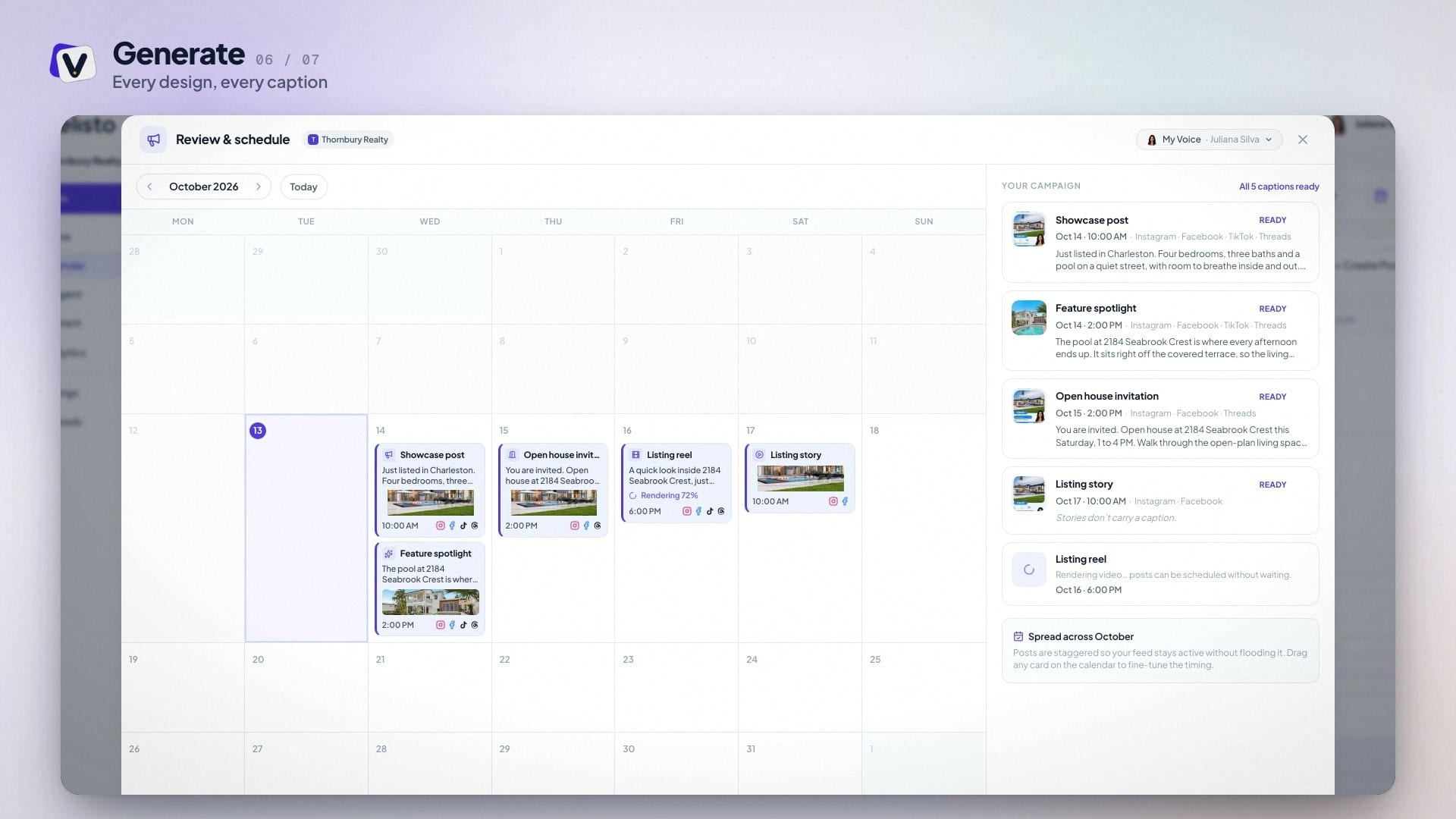
Real estate social media automation software takes the repeated work out of posting: it turns listings and ideas into ready posts, places them on a calendar and publishes them at set times, so your Instagram, Facebook and TikTok stay active through weeks of showings and closings. General schedulers automate only the last step, publishing posts you made somewhere else.
Velisto automates the steps before that too. Listings come in from a property page URL, a CSV or a Houzez website. A listing campaign turns one property into posts, Stories and an optional reel for a stage such as Just Listed, Open House or Just Sold, spread across the dates you pick. For the weeks without a listing, Plan my content suggests real estate topics and drafts branded posts for your dates and channels.
You stay in control of what goes out. Generated posts wait for your review, and Velisto Agent changes nothing until you confirm. You review and approve the content; Velisto publishes it at the scheduled time, to Instagram, Facebook Pages, TikTok, Threads and YouTube.
Automated real estate social media posts still need an agent's judgment. Here is where Velisto does the work and where you keep the say.
| What Velisto does | Your part | |
|---|---|---|
| Getting listings in | Imports a listing from its property page URL or a CSV. A connected Houzez website sends its new and updated listings. | Check the facts and photos once. |
| A campaign for one listing | Writes posts, Stories and an optional reel for one stage, from Coming Soon and Just Listed to Open House and Just Sold, and spreads them across the dates you pick. | Choose the stage, photos and channels, then review each piece. |
| The open house invitation | Schedules it after the rest of the campaign, no more than 7 days before the event and always before it. | Keep the date and times on the listing current. |
| A listing changes status | For 14 days after a listing is marked sold, under contract, reduced in price or relisted, prompts you to create the matching campaign. | Decide whether to post, and check older posts that still say Just Listed. |
| Weeks without a listing | Plan my content suggests real estate topics, dates and formats, and drafts branded posts for each channel. | Approve each channel's drafts before they're scheduled. |
| Posting times | Places posts in your posting slots, in your workspace's timezone. | Set the slots once. |
| Evergreen posts | Repeats a post every day, every few days, weekly, every two weeks or monthly, with optional fresh wording. | Repeat only messages that stay true. |
| One post, every channel | Sends a post to each connected channel, with its own caption on each if you want one. | Pick the channels. |
| First comment | Posts a first comment right away or up to a day later (not on TikTok or Stories). | Write it once. |
| Best time to post | Suggests your own best windows once 10 posts from the last 90 days are measured. | Decide whether to use them. |
STEP BY STEP
The listing side of real estate social media automation, step by step. Most of it is set up once per listing; the prompts bring you back when something changes.
WEEKS WITHOUT A NEW LISTING
Plan my content suggests real estate topics for your audience, with dates and formats, and drafts branded posts for each channel. You approve each channel's drafts before they're scheduled.
Plan my contentSet your posting slots once and send each post to the next free one. Repeat evergreen posts on a schedule, with fresh wording if you want it.
Real estate social media schedulerAsk the chat assistant to make a branded graphic, schedule a post or move one to another day. It changes nothing until you press Confirm & schedule or Confirm changes.
Velisto AgentFOR TEAMS AND BROKERAGES
Each agent's name, headshot, license number, contact details and tone go into their own posts, alongside the brokerage's logo and colors.
Brand Kit & VoiceAn admin or marketing coordinator can create and schedule as any agent. Team covers 5 users and 15 social profiles; Brokerage covers 30 users and 50 profiles. Agency plans give each client its own workspace.
Teams & BrokeragesGeneral schedulers automate publishing. Velisto also makes the posts and follows each listing from launch to sale.
| Velisto | Hootsuite | Buffer | Later | |
|---|---|---|---|---|
| Posts from a listing | Listing campaigns from an imported listing | Not documented | Not documented | Not documented |
| Prompts when a listing's status changes | For 14 days after sold, under contract, a price drop or relisting | Not documented | Not documented | Not documented |
| Ideas for weeks without a listing | Plan my content suggests topics and drafts branded posts | Wisdom AI generates content and ideas | AI Assistant generates ideas and repurposes posts | Ideas (beta), using AI credits |
| Best time to post | From your own posts, once 10 are measured | From your last 30 days of results | General engagement patterns; recent performance on some plans | One profile on all paid plans; across profiles from Growth |
| Instagram Stories | Published at the scheduled time | Phone notification, per its help docs | Automatic, except Stories with links, text or stickers | Automatic from Business profiles only |
| Solo agent, 3 channels | $59/mo ($49 yearly) | $99/mo, billed yearly | $18/mo ($15 yearly) | $18.75/mo, billed yearly |
Prices checked September 24, 2026, on each vendor’s pricing page; confirm before you buy. Buffer suits cheap publishing to more networks; Hootsuite suits teams where a second person must approve posts. Compare Velisto head to head with Hootsuite, Buffer and Later, or read the full scheduler comparison and tools comparison.
STRAIGHT ANSWERS
Automated posts follow the same advertising rules as any other. See the US rules in our real estate social media compliance guide, and the practical guide to real estate social media automation for what to automate and what to keep.
YOUR QUESTIONS, ANSWERED
Answers about what runs on its own, what stays with you, and trying Velisto.
Visit the FAQ hubMORE TIME FOR THE PEOPLE YOU HELP
Try it on one of your own listings. 7-day free trial · no card needed.