
PUBLISHING & SCHEDULING

Create once.
Show up everywhere.

Reach your audience across your connected social channels without uploading the same content again and again. Tailor each post, publish now or schedule ahead—and get back to your clients.

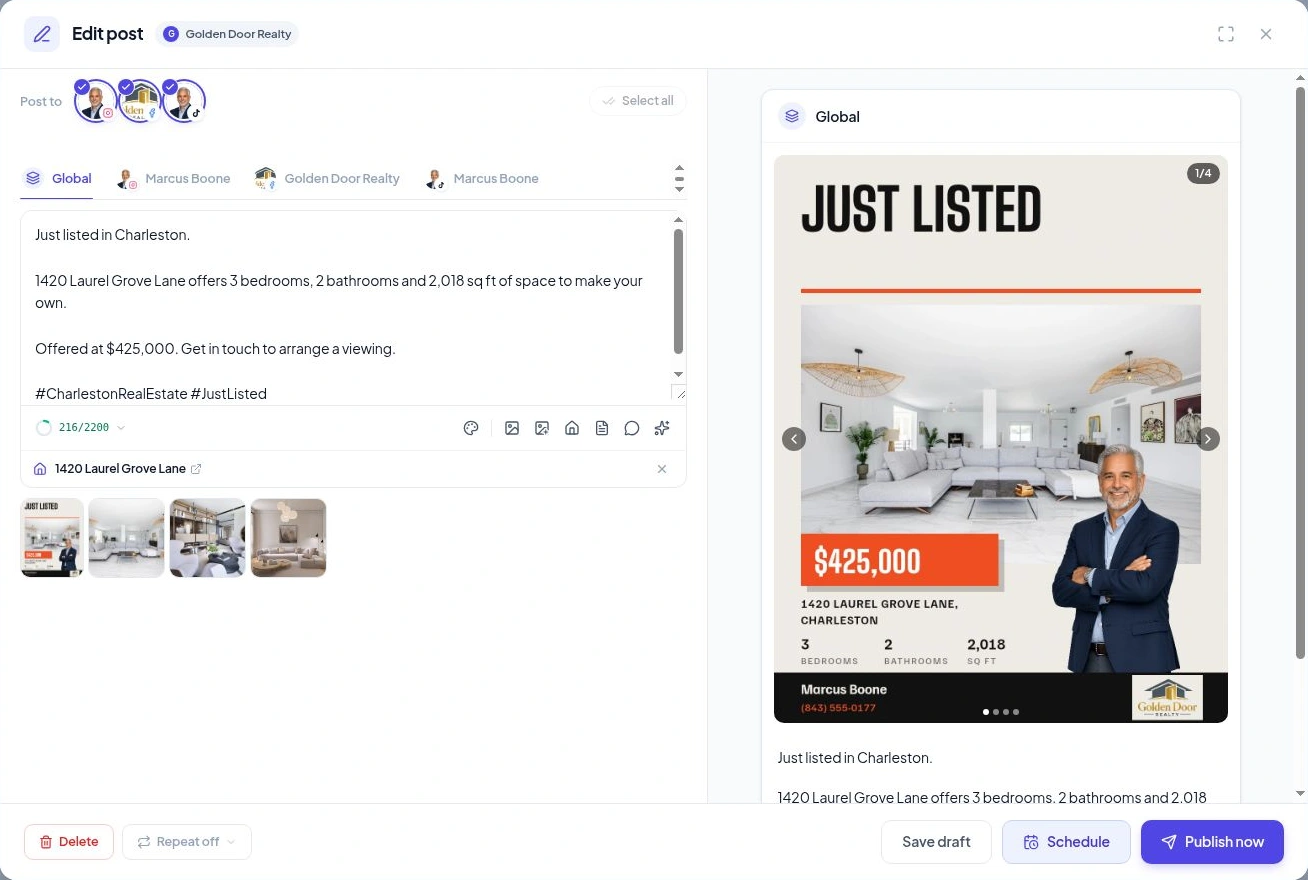
The caption, channels, media and next step—in one composer.

ONE WORKSPACE. YOUR CONNECTED CHANNELS.

Share the property.
Skip the repeat work.

Choose the profiles that should receive the post, add your media once and review the content before it goes out.

Facebook PagesInstagramTikTok

Available formats depend on the channel and connected account. See supported channels

START WITH THE SHARED CAPTION

One property. One starting point.

Just listed in Charleston. Three bedrooms, generous living space and a place to make your own. Get in touch to arrange a showing.

Write the shared version in the Global tab.

MAKE IT FIT EACH CHANNEL

A little more personal, wherever it lands.

Open a channel tab to tailor the wording. Check the preview and supported options before you publish.

  • Keep one consistent property story.
  • Change the caption where it helps.
  • Choose only the profiles you need.

PUBLISH ON YOUR TERMS

Ready now?
Or ready for next week?

Create content when you have the time. Choose when your audience sees it.

Publish now

The post is ready and the timing is right. Send it to your selected profiles from the composer.

Schedule ahead

Choose a date and time or an available posting slot. Velisto publishes the scheduled post when it is due.

Save a draft

Still finishing the caption or waiting on photos? Save your progress and return when you are ready.
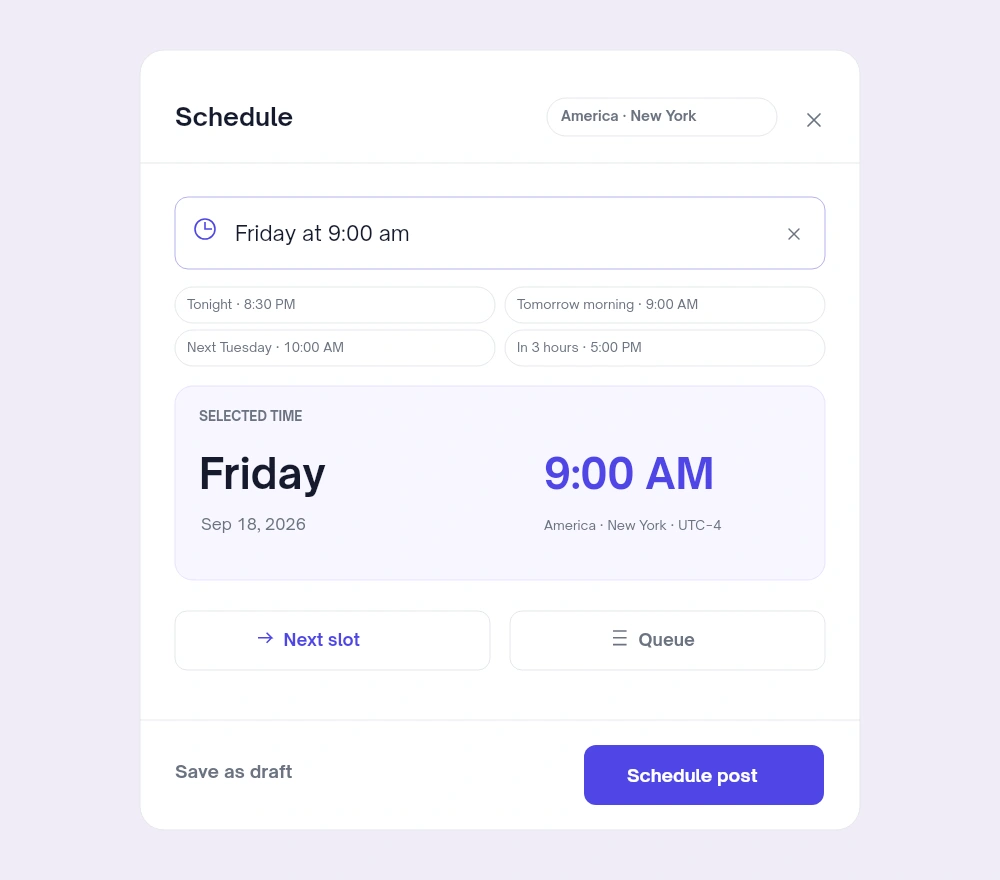
Velisto schedule dialog with natural-language time, selected date, timezone, next posting slot and queueView preview

A TIME THAT FITS YOUR PLAN

Pick a date.
Or say when.

Type a time such as “tomorrow at 9am,” choose it from the calendar, or use the next available slot in your posting schedule.

  • See the selected date, time and timezone.
  • Use Next slot or browse the queue.
  • Confirm with Schedule post.

Set up your weekly posting slots in Scheduling settings to give the queue a regular rhythm.

THE POST DOESN’T DISAPPEAR AFTER YOU CLICK

See what’s scheduled.
Check what went out.

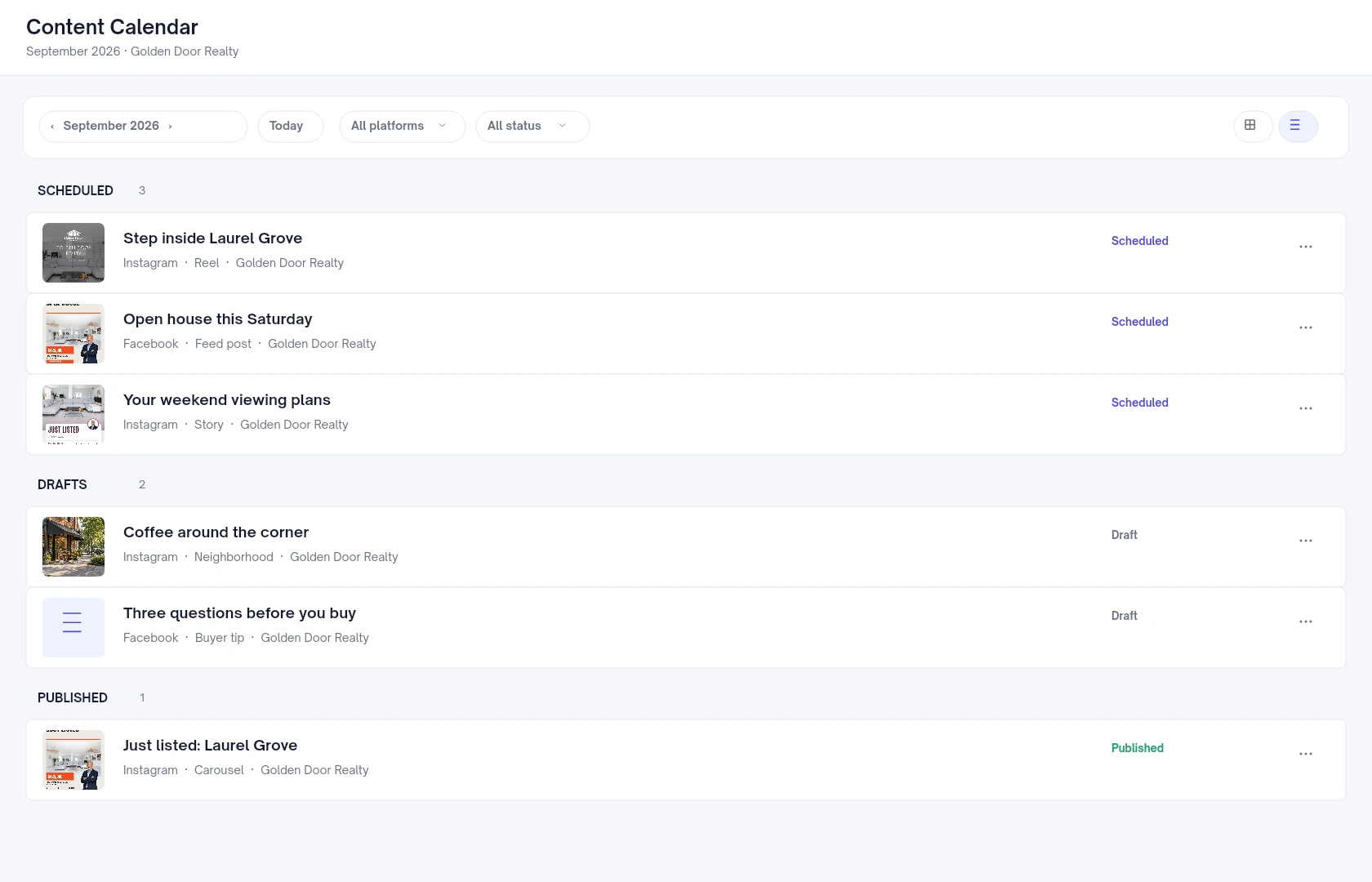
Return to the calendar to review upcoming content and published posts. Failed posts have their own status, so you can find what needs attention.

Velisto List view showing scheduled, draft and published real estate postsView preview

YOUR QUESTIONS, ANSWERED

A closer look
at publishing.

A few useful details before you start.

Visit the FAQ hub
Can I publish to multiple channels from one post?
Yes. Select the connected profiles you want to use, review each channel’s content and then publish or schedule the post. Supported media and formats vary by channel.
Can each channel have a different caption?
Yes. Start with the shared caption in the Global tab, then use a channel tab to make changes for that profile.
What is the difference between cross-posting and scheduling?
Cross-posting is sharing content to multiple selected channels. Scheduling sets when it goes out. You can use both together.
How do posting slots work?
Set up weekly times in Scheduling settings. When scheduling a post, choose Next slot or browse the queue, review the selected time and confirm.
Which timezone is used?
The scheduling dialog shows the timezone for your workspace. Check the displayed date, time and timezone before confirming.
Can I edit content that is already scheduled?
Yes. Open the scheduled post to change its content, or adjust its publishing time before it goes out. Saving content edits keeps its existing scheduled time.
Can I post to a personal Facebook profile?
Velisto supports Facebook Pages. Check the channel guide for the supported account types and formats on each platform.

MAKE ROOM FOR YOUR REAL ESTATE BUSINESS

Keep your channels active.
Keep your day for clients.

Prepare the content once. Share it across the channels your audience uses.
Product preview

See Velisto in action

Demo video coming soon

This space is ready for the Velisto product tour.

Explore how Velisto works