Most agents treat a new listing like a single social post. You snap the photos, pick your favorite, type "Just listed!" and move on. A week later the property has gone quiet on your feed, and by the time it sells you have posted about it exactly once. That is the marketing equivalent of printing one flyer and leaving it in a drawer.
A listing is the richest raw material you will ever get for free. It comes with professional photography, a real price, a real neighborhood, real features, and a built-in reason for people to pay attention. Squeezing a single post out of it is like buying a whole cow for one steak.
This post gives you a repeatable system: ten distinct pieces of content from one listing, each with a concrete example built around a fictional property — a three-bedroom waterfront apartment at 12 Ocean Drive. Then it shows you how to space the ten across three weeks, how to tune them per platform, and how to produce the whole set in a single hour. Steal the formats, swap in your own address, and you will never stare at a blank caption box again. For the plan these posts slot into, from platform choice to posting cadence and Fair Housing wording, see our real estate social media marketing guide. For posts between listings, see our real estate social media post ideas.
Why one-and-done posting wastes your best asset
Three reasons the single-post habit costs you deals.
Reach is a lottery, not a guarantee. On any given day a fraction of your followers see any given post. Publish once and most of your audience never knew the listing existed. Publish ten times, in ten different formats, and you win ten separate rolls of the dice.
Different formats reach different people. A carousel gets saved by serious buyers. A reel gets shared by nosy neighbors who know a buyer. A LinkedIn post gets seen by the referring agent across town. One property, many doors.
Repetition builds authority. When the same beautiful home shows up in your feed as a tour, a price breakdown, and a neighborhood guide, followers stop seeing "an agent posting a listing" and start seeing "the agent who owns this street." That reputation is what wins the next instruction — and it is worth more than the sale itself.
There is a seller-facing bonus, too. Ten pieces of visible marketing is exactly what your vendor hoped they were paying for. Screenshots of the campaign make the progress update email write itself, and the next vendor you pitch gets shown a system, not a promise.
The ten formats, with an example each
1. The just-listed announcement
Your headline act. One strong hero image, the address, the price, and the two or three details that make people stop scrolling.
12 Ocean Drive: "Just listed — 12 Ocean Drive. Three bedrooms, floor-to-ceiling water views, and a wraparound terrace built for sunsets. Offers invited." Pair it with the single best photo you have.
2. The feature-detail carousel
Break the home into swipeable slides — one feature per slide. Carousels earn saves and long dwell time because people swipe to the end.
12 Ocean Drive: Slide one, the kitchen island. Slide two, the primary suite. Slide three, the terrace. Slide four, the building gym. A closing slide with price and a "DM to view" line. Design Studio can auto-fill a branded carousel template straight from the listing, so all four slides share the same look without you touching a design app.
3. The photo-tour reel
Stitch five to eight of your best photos into a fifteen-second vertical reel with motion and a music track. This is your reach engine — video travels further than stills on every platform.
12 Ocean Drive: Open on the water view (the strongest shot), cut through the living space, kitchen, bedroom, and end on the terrace at golden hour. Overlay the address and price. The reel maker renders this in the background while you get on with your day.
4. The story teaser with a poll
Stories are low-stakes and interactive. Use a poll or a "this or that" sticker to pull people into the listing before you have even shown the whole thing.
12 Ocean Drive: A single photo of the terrace with a poll: "Morning coffee here — yes or absolutely yes?" It sounds trivial. It also tells the algorithm people are engaging, and it warms them up for the full tour.
5. The neighborhood spotlight
Sell the lifestyle, not just the four walls. Buyers purchase a location as much as a floor plan.
12 Ocean Drive: "Living at 12 Ocean Drive means the marina is a two-minute walk, three coffee roasters are on your doorstep, and the coastal path starts at your gate." No interior shots needed — this one sells the ZIP code.
6. The price and value breakdown
Address the number head-on. Buyers are doing the maths anyway; get ahead of it and you look confident and transparent.
12 Ocean Drive: "Why 12 Ocean Drive is priced where it is — comparable waterfront units traded twelve percent higher last quarter, and this one comes with a rare second parking space." Honesty about price builds more trust than any glossy photo.
7. The open-house invite
A dated, specific call to action. Give people a reason to show up at a particular time.
12 Ocean Drive: "Open house this Saturday, 11am to 1pm, 12 Ocean Drive. Come for the view, stay for the terrace. First twenty visitors get the full floor plan." Schedule it a few days ahead so it lands before the weekend.
8. The buyer-FAQ post
Answer the question every buyer asks but is too polite to lead with. You become the helpful expert instead of the salesperson.
12 Ocean Drive: "Three questions I keep getting about 12 Ocean Drive: What are the HOA fees? Is the terrace north or south facing? Can you rent it out? Here are the honest answers." FAQ posts get saved and screenshotted, which the algorithm loves.
9. The behind-the-scenes
Show the work. A quick clip of you prepping the property, meeting the photographer, or setting up for the open house makes you human.
12 Ocean Drive: "6am at 12 Ocean Drive, staging the terrace before the shoot — because that sunrise light only lasts twenty minutes." People follow people, not listing sites.
10. The just-sold follow-up
Close the loop. The sale is proof you deliver, and it is your strongest ad to the next seller on the street.
12 Ocean Drive: "Sold — 12 Ocean Drive, over asking, in eleven days. To the new owners: enjoy those sunsets. To the neighbors wondering what your home is worth right now: my line is open." One post, and half the building starts thinking about moving. For 25 more ways to say it, see our just sold captions.
Spacing the ten across three weeks
Ten posts on one property does not mean ten days of wall-to-wall 12 Ocean Drive. Spread across three weeks and woven between your other content, it reads as a campaign, not a broken record.
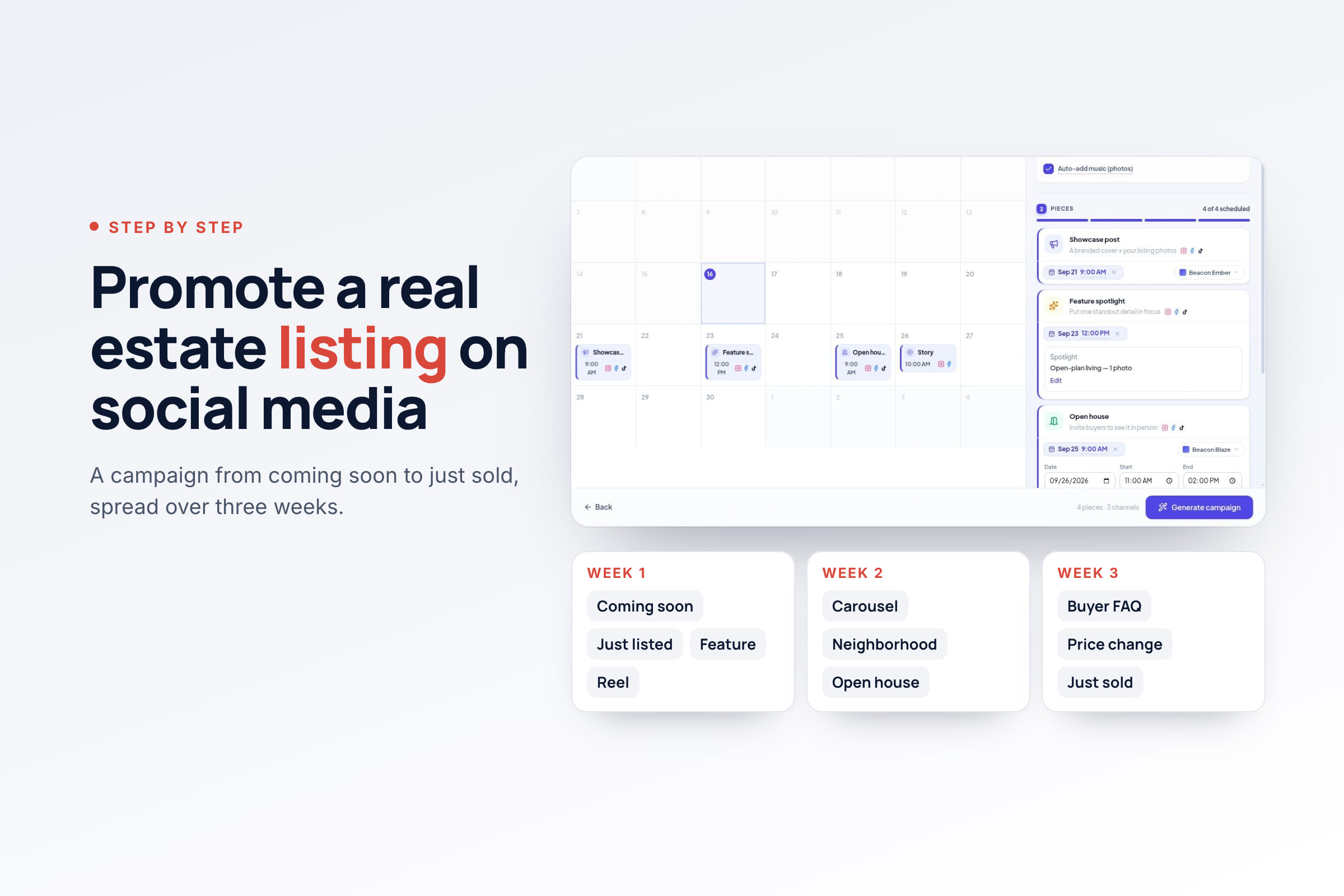
Week one — launch. The just-listed announcement on day one, the story poll the next day while attention is warm, and the feature carousel at the end of the week for the serious buyers who want detail.
Week two — depth. The photo-tour reel early in the week (your reach play), the neighborhood spotlight midweek, and the price breakdown at the weekend when buyers have time to think about numbers.
Week three — urgency. The buyer-FAQ post to clear the last objections, the behind-the-scenes to stay human, and the open-house invite two or three days before the date itself.
Whenever it happens — the close. The just-sold post goes out when the deal completes, whether that is week two or week eight. It is the one post with no schedule and the longest shelf life.
If the property sells faster than the plan — good problem — compress rather than abandon. Skip ahead to the just-sold post while the listing is still fresh in feeds, and bank the unused formats: the neighborhood spotlight and FAQ work almost unchanged for the next property on the same street.
Tune the same content per platform
The ten formats are platform-agnostic; the caption is not. The efficient move is one asset, four captions — not four separate campaigns.
Instagram gets the visual-first version: tight caption, hook line up front, hashtags tucked into the first comment. Facebook tolerates — and rewards — a longer, warmer caption with the full story, and the open-house invite belongs in local groups where the actual neighbors live. LinkedIn wants the professional angle: the price breakdown becomes a market observation, the just-sold becomes a case study with a lesson. TikTok takes the reel and the behind-the-scenes with a looser, spoken-first tone. Same ten pieces, four dialects — and per-channel captions on a single scheduled post make the whole thing a two-minute job, not a rewrite.
Batch all ten in one hour
Ten posts sounds like ten afternoons. It is not, if you batch. Here is the one-sitting workflow.
Minutes 0 to 10 — gather. Pull the listing into your workspace. If you run on Houzez, the sync brings the photos, price, and details across automatically, so you are not re-typing anything.
Minutes 10 to 30 — draft the captions. Feed the listing to the AI and ask for all ten angles at once. You are not looking for finished copy — you are looking for a strong first draft in your own brand voice that you can trim. The AI Agent can plan the whole set as a mini campaign, so you get the announcement, the carousel copy, the FAQ, and the rest in one pass.
Minutes 30 to 45 — build the visuals. Auto-fill the carousel and story templates in Design Studio, and queue the photo-tour reel to render in the background. Export what you need as PNG, JPG, or PDF. This is the entire job of a real estate content creation tool: the designs are built from the listing you already have, not from a blank canvas.
Minutes 45 to 60 — schedule. Drop all ten onto the calendar following the three-week rhythm above. Add per-channel captions where a platform deserves a different tone, and set a first comment with the extra detail or hashtags. Hit schedule, and one listing now feeds your feed for the better part of a month — one calendar covering every channel, filled in a single sitting.
The discipline is in the batching, not the volume. Ten posts written and designed in isolation would eat your week. Ten posts pulled from one listing in a single sitting is just a system — and once you have run it twice, it becomes muscle memory.
Your next listing is a content goldmine. Mine all ten seams. Get started and turn your next property into two weeks of posts in one sitting.