
Create with AI (in the sidebar's create menu) is the one-post workflow: you give it a starting point, it returns a finished post — caption written in your voice, design built in your brand — and you approve, edit or regenerate before anything is scheduled.
Two starting points
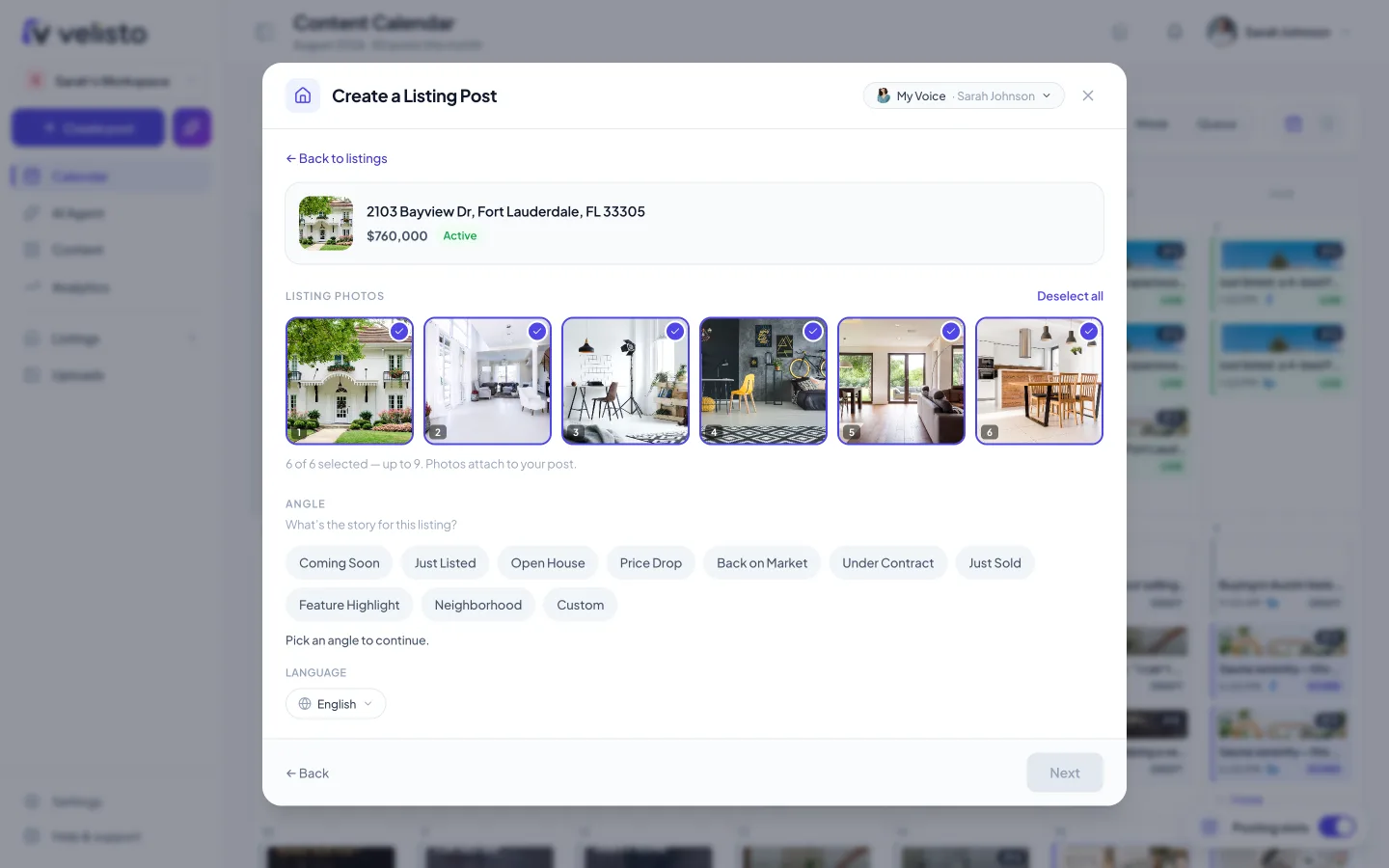
- From a listing — pick one of your listings. The AI knows its price, features, photos and status, and writes the post around them. You choose the angle — just listed, feature spotlight, open house, price, neighborhood — so a single listing can fuel many distinct posts.
- From an idea — type what you want to post about ("spring market update for Austin buyers", "5 staging mistakes I see every week"). Right for the content between listings that keeps your feed alive.
What you get
By default Velisto produces a branded picture post: a designed image using your listing photos, colors and logo, paired with a caption. Depending on the angle and starting point you can also generate carousels and stories.
Review everything on the result screen:
- Caption — edit inline, regenerate, or adjust length. Language follows your workspace setting.
- Design — swap in a different template or photo without regenerating the caption.
- Channels — pick which of your connected profiles it goes to; the caption can be tuned per channel.
Nothing publishes on its own. Every generated post waits for you to schedule it or publish it now.
When to use something bigger
One post is right for a quick update. If the listing deserves a campaign, use a Listing Kit; if it's your calendar that needs feeding, use Fill my week.